

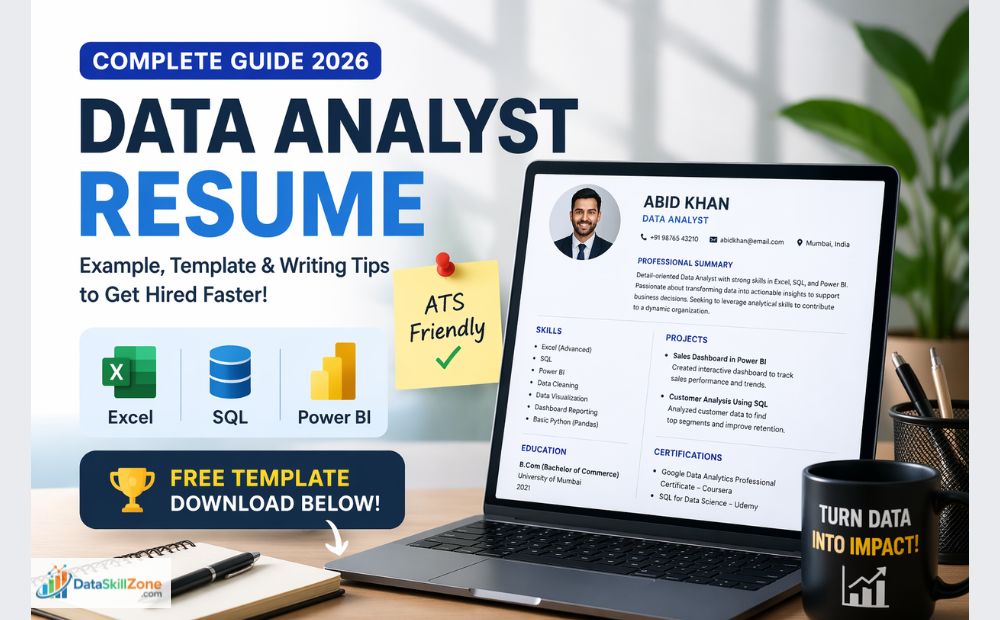
 By
By Introduction
As we know, In today’s competitive corporate job market, creating a data analyst resume that gets shortlisted in 2026 is more important than ever. Many students and working professionals learn Excel, SQL, Power BI, and Python, but still fail to get interview calls.
The main reason is poor resume structure. An ATS friendly data analyst resume for freshers and experienced candidates in India helps recruiters quickly understand your skills and experience.
But still, only a few get interview calls from HR.
Why its so?
Because their resume does not show their skills properly.
For most aspiring data analysts, the resume is the first step toward getting job interviews. Recruiters often review hundreds of applications and spend only a few seconds scanning each resume.
Because of this, learning how to prepare a data analyst resume that stands out is extremely important for anyone trying to enter the data analytics field.
As a data analyst aspirant, your resume is not just a piece of paper. It is your first impression, your marketing tool, and your personal portfolio. Before any HR manager talks to you, they first go through your resume.
Incase If your resume looks boring, confusing, or generic, it gets rejected in 7–10 seconds on spot.
Yes, recruiters spend only a few seconds on one resume.
Recruiters usually scan resumes very quickly before deciding whether to continue reading. If you want to understand this process better, you can learn more about how recruiters read resumes and why the first 10 seconds matter.
Here, I will explain everything step by step in simple language, especially for:
- Freshers
- Non-IT students
- Working professionals
- MIS executives
- Career switchers
So Let’s begin.
To prepare a data analyst resume that gets shortlisted, focus on relevant skills, measurable achievements, practical projects, ATS-friendly keywords, and a clean professional format. A strong data analyst resume should quickly show recruiters that you can work with Excel, SQL, dashboards, reporting, and real business data.
Why a Strong Data Analyst Resume Matters
A well-structured data analyst resume is essential for standing out in today’s competitive job market. Recruiters often review many applications for a single role, so your resume must clearly highlight your skills and experience in a short amount of time.
A strong data analyst resume helps you:
• Create a strong first impression – Recruiters typically scan resumes quickly, so a clear and well-organized resume makes it easier for them to understand your profile.
• Showcase your technical skills – Your resume should highlight important data analytics tools such as Excel, SQL, Python, Power BI, and data visualization tools.
• Demonstrate real problem-solving ability – Employers want candidates who can analyze data and generate insights that support business decisions.
• Pass Applicant Tracking Systems (ATS) – Many companies use automated systems to filter resumes. Including relevant keywords in your data analyst resume increases the chances of getting shortlisted.
• Present your experience clearly – A structured resume makes it easier for recruiters to quickly understand your projects, achievements, and analytical capabilities.
In simple terms, a well-prepared data analyst resume acts as your professional introduction. It helps employers quickly recognize your potential and increases your chances of being invited for an interview.
Why Resumes Get Rejected In Most of the Cases.
Before learning how to write a strong resume, you must understand why most resumes fail.
Most Common Reasons for Resume Rejections
Most resumes are rejected because of these mistakes:
- No clear job target
- No proper formatting
- Too much unnecessary information
- No project experience included
- No numbers or results
- Copy-paste content
- Too many pages
- Spelling and grammar mistakes
Recruiters see hundreds of similar resumes every week. If yours looks like everyone else’s, it will not stand out.
That’s the reason you need a customized, skill-focused, and result-oriented resume.
Resume Mistakes vs Best Practices
Many good candidates get rejected because of small resume mistakes. Use this simple comparison table to understand what recruiters dislike and what actually improves shortlist chances.
| ❌ What Often Goes Wrong | ✅ What Works Better |
|---|---|
| Same resume for every company Sending one generic resume everywhere. |
Customize each application Update keywords, summary, and skills based on the job role. |
| Only tool names listed Excel, SQL, Power BI written without examples. |
Show real usage Explain what you created, automated, analyzed, or improved using those tools. |
| Large text paragraphs Hard to read quickly. |
Use clean bullet points Make achievements short, clear, and easy to scan in seconds. |
| No achievements mentioned Skills are written, but no impact shown. |
Add measurable results Example: Reduced reporting time by 40% or improved process accuracy. |
| Messy design Too many colors, icons, or confusing layout. |
Keep it simple Use professional fonts, clear headings, and ATS-friendly formatting. |
| Spelling or contact mistakes Even small errors hurt trust. |
Final review before sending Check grammar, phone number, email, and LinkedIn profile. |
Understanding What Recruiters Look for in a Data Analyst Resume
Before writing your resume, just think like a recruiter/employer.
Many career experts also recommend highlighting achievements and measurable results. You can read additional resume tips from Indeed career experts.
What HR and Hiring Managers Want
When recruiters open your resume, they look for:
- Do you know Excel, SQL, Power BI, Python?
- Have you worked on real data?
- Can you solve business problems?
- Can you explain data clearly?
- Are you serious about this career?
They don’t care about your school achievements or long paragraphs about hobbies.
They care about skills + proof + attitude.
Recruiters highly value database skills, so learning SQL is important. You can also explore our complete SQL for Data Analysis guide to understand joins, filtering, aggregations, and real business queries.
Structure of a Perfect Data Analyst Resume (ATS Friendly Format)
Your resume should follow a clean and professional structure.
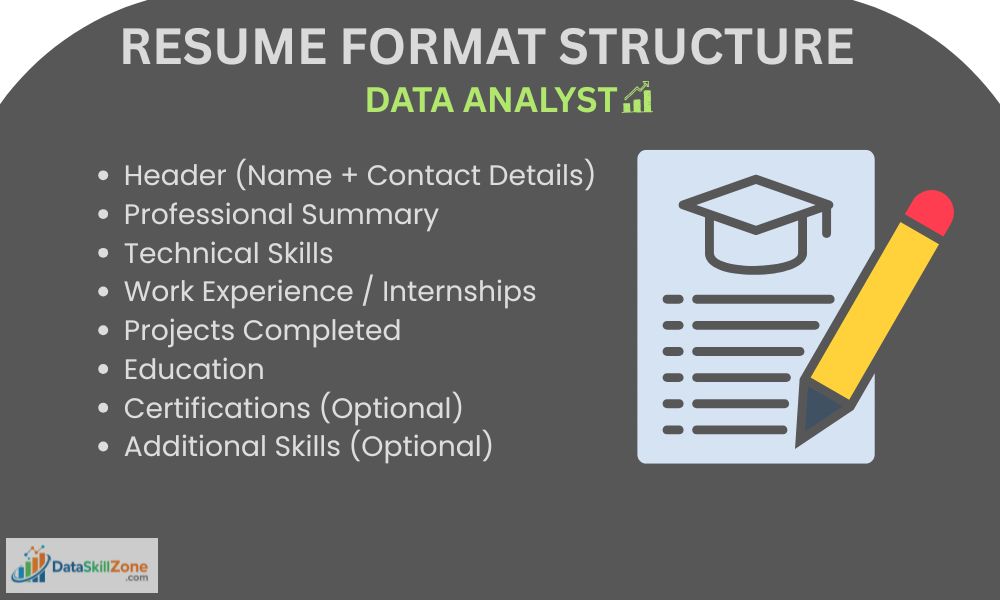
Basic Sections of a Data Analyst Resume
Your resume must include:
- Header (Name + Contact Details)
- Professional Summary
- Technical Skills
- Work Experience / Internships
- Projects Completed
- Education
- Certifications (Optional)
- Additional Skills (Optional)
This data analyst resume format for freshers in India is perfect for beginners.
Let’s understand each section in detail.
Header – Create a Strong First Impression
What to Include in the Header
Your header should contain:
- Full Name
- Mobile Number
- Professional Email ID
- LinkedIn Profile
- GitHub / Portfolio (if available)
- City, State
Example
John Dsouza
📞 +91XXXXXXXXXX
📧 johndsouza@gmail.com
🔗 linkedin.com/in/johndsouza
📍 Goa, India
Tips
- Use a simple font
- No fancy colors
- No photo (unless asked)
- Avoid childish email IDs
Professional Summary – Your 3-Line Sales Pitch
This is one of the most important parts of your resume.
What Is a Professional Summary?
It is a short paragraph (3–4 lines) that explains:
- Who you are
- How Your Skills benefit Company
- What profile you want
Good Example
“Detail-oriented Data Analyst with 2+ years of experience in Excel, SQL, and Power BI. Skilled in analyzing sales and operational data to improve business decisions. Passionate about transforming raw data into meaningful insights.”
Bad Example
“I am a hardworking person looking for a challenging opportunity.”
This tells nothing So, Customize your resume for data analyst job applications based on job description.
Technical Skills – Show Your Tools Clearly
Your skills section part must be clean and organized. According to LinkedIn career advice, recruiters often prefer resumes that clearly highlight skills, achievements, and relevant experience.
How to Write Technical Skills
Do not write in paragraph form. Use bullet points instead.
Example
Technical Skills
- Excel: VLOOKUP, XLOOKUP, Pivot Tables, Power Query
- SQL: Joins, Subqueries, CTEs, Window Functions
- Power BI: DAX, Data Modeling, Dashboards
- Python: Pandas, NumPy, Matplotlib
- Tools: MySQL, MS Access, Google Sheets
Tips
- Mention only skills you really know
- Don’t lie
- Be specific
- Update regularly
If you want to strengthen your spreadsheet knowledge, read our detailed guide on Excel Skills for Data Analysis where we cover formulas, Pivot Tables, dashboards, and reporting skills used in real jobs.
Work Experience – Turn Your Job into Data Experience
Even if you’re not a data analyst, your job involves data.
For Working Professionals (Like MIS Executives)
If you are working as MIS, accountant, sales executive, etc., convert your work into data language.
Example
MIS Executive – XYZ Company (2023–2025)
- Prepared daily, weekly, and monthly sales reports using Excel
- Automate reports using Pivot Tables and Power Query
- Reduced reporting time by 40%
- Analyzed distributor performance using dashboards
See? This looks like a data role.
Projects – The Heart of a Data Analyst Resume with Projects
If you are a fresher, projects are more important than degrees.
Why Projects Matter
Projects show:
- Practical knowledge
- Problem-solving ability
- Real-world thinking
How to Write Projects
Use this format:
Project Name
Tools Used
Problem
Solution
Result
Example
Sales Analysis Dashboard
Tools: Excel, Power BI
- Analyzed 2 years of sales data (50,000+ records)
- Created interactive dashboard
- Identified top 10 low-performing regions
- Helped improve sales by 15%
If you want to add dashboard projects to your resume, check our Power BI Developer Guide to learn how to build interactive reports, data models, and business dashboards.
Education – Keep It Simple
How to Write Education Section
Example:
Bachelor of Commerce
Goa University | 2021–2024
CGPA: 7.8/10
No need for school marks unless you are a fresher.
Certifications – Add Trust to Your Profile
Certifications are not necessary, but they help.
Popular Certifications
- Google Data Analytics
- Microsoft Excel
- Coursera SQL
- Udemy Power BI
Mention only completed ones.
Resume Formatting – ATS Friendly Data Analyst Resume Tips
Many companies use ATS (Applicant Tracking System).
Many candidates unknowingly make small mistakes that reduce their chances of getting shortlisted.
You can also check these common resume mistakes that are hurting job applications and learn how to avoid them.
ATS-Friendly Resume Tips
- Use simple fonts (Arial, Calibri)
- No tables or images
- No graphics
- Use keywords
- Save in PDF
High-Value Keywords for Data Analyst Resume
Using keywords helps your resume pass ATS.
Important Long-Tail Keywords
- entry level data analyst resume format
- data analyst resume for freshers in India
- ATS friendly data analyst resume
- best resume for data analyst job
- SQL Excel Power BI resume sample
- data analyst resume with projects
- MIS executive to data analyst resume
Use them naturally.
Common Resume Mistakes You Should Avoid

Avoid These Errors
- Fake experience
- Spelling mistakes
- Too many colors
- Long paragraphs
- No achievements
- Same resume for all jobs
How to Customize Resume for Every Interview
Never send the same format or content resume everywhere.
Customization Method
- Read job description
- Highlight matching skills
- Modify summary
- Adjust keywords
- Change project focus
This increases selection chances by 3x.
Sample Resume Template (Text Format)
According to the Harvard Office of Career Services, a strong resume should focus on clear structure, measurable achievements, and relevant skills.
Here is a simple structure you can follow:
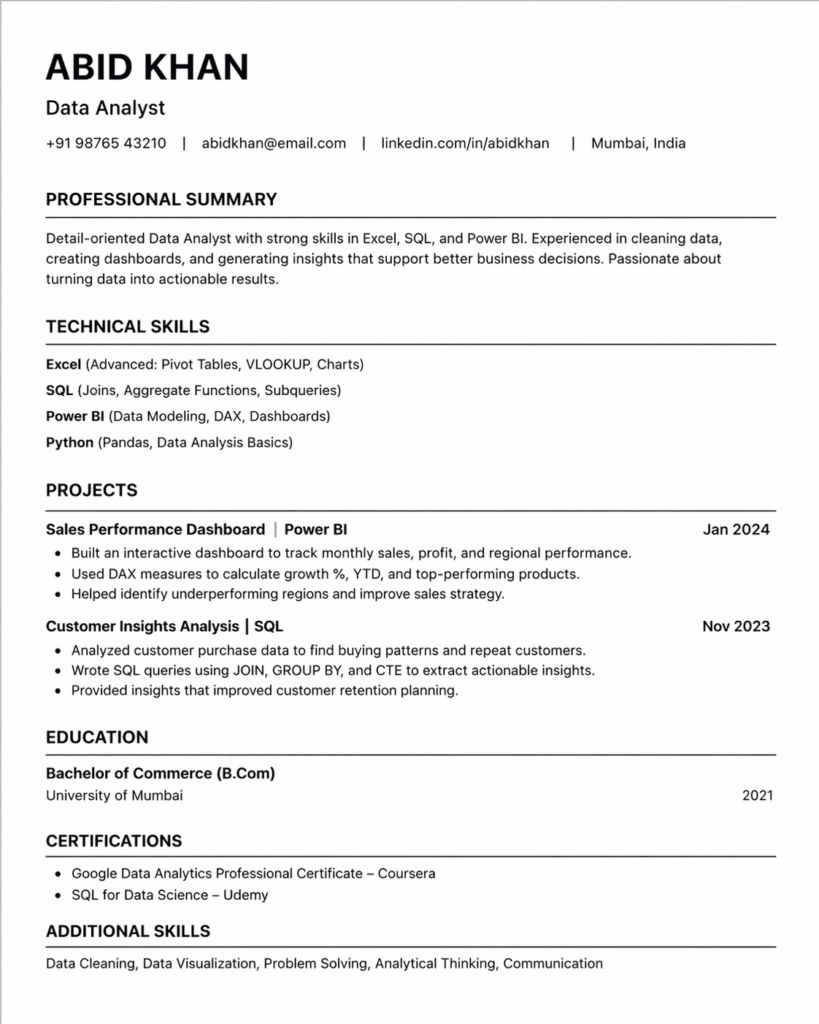
- Name
- Contact | Email | LinkedIn | City
- Professional Summary
- Technical Skills
- Work Experience
- Projects
- Education
- Certifications
- Additional Skills
Best Resume Format for Data Analyst in 2026
Many candidates search for:
- Data analyst resume sample PDF in India
- Entry level data analyst resume format
- Professional data analyst CV format
because they want a clear idea of how a modern, job-ready resume should look in 2026.
With companies using advanced ATS systems, following the right structure is no longer optional. it is necessary for getting shortlisted.
If you follow this step-by-step guide, you can easily create an ATS friendly data analyst resume with projects and technical skills that attracts recruiters and passes automated screening software. This format helps you present your Excel, SQL, Power BI, and Python skills in a clean and organized way, making it easier for HR managers to understand your strengths within a few seconds.
If you are unsure how to design your resume, you can also use some free ATS-friendly resume builder tools to create a professional layout quickly.
A well-structured resume also highlights your real project experience, measurable achievements, and problem-solving ability instead of just listing tools. Whether you are a fresher, career switcher, or working professional, using this format improves your chances of getting interview calls from top companies.
By following this proven resume structure, you not only improve readability but also increase your visibility on job portals and search engines. This helps your profile appear in relevant searches, improves click-through rates, and builds a strong professional image in the competitive data analytics job market.
As a result, your resume becomes more than just a document, it becomes a personal branding tool that reflects your skills, dedication, and career goals.
Final Resume Checklist Before Applying
- ✅ Use ATS-friendly resume format
- ✅ Add Excel, SQL, Power BI, Python skills
- ✅ Include real projects with results
- ✅ Keep resume one page (freshers)
- ✅ Use clean formatting and readable fonts
- ✅ Check grammar and spelling mistakes
- ✅ Update LinkedIn and contact details
- ✅ Save resume in PDF format
Your Resume Is Your Career Weapon

A strong data analyst resume can change your life.
It can:
- Get you interviews
- Increase salary
- Open global opportunities
- Build confidence
Remember, companies don’t hire resumes. They hire people who can solve problems. Your resume should show that you are one of them.
Start improving your resume today.
Don’t wait.
📄 Free Data Analyst Resume Template
Use this ATS-friendly resume template to create a professional data analyst resume for freshers and experienced candidates. Clean layout, recruiter-friendly structure, and ready to customize.
⬇ Download Resume TemplateFrequently Asked Questions
Clear answers to the most common questions about creating a data analyst resume that gets shortlisted in 2026.
How do I write a data analyst resume for freshers?
Start with a professional summary, technical skills, academic projects, certifications, and education. Highlight Excel, SQL, Power BI, Python, and practical work that shows analytical ability.
What makes a data analyst resume ATS friendly?
An ATS friendly data analyst resume uses simple formatting, clear headings, standard fonts, bullet points, and relevant keywords from the job description so screening software can read it correctly.
What skills should be included in a data analyst resume?
Important skills include Excel, SQL, Power BI, Tableau, Python, data cleaning, dashboards, reporting, statistics, visualization, and communication skills relevant to business analysis.
Do I need projects in a data analyst resume?
Yes. Projects are one of the best ways to prove your skills. Add dashboards, sales analysis, automation reports, or portfolio projects that show real problem-solving ability.
How long should a data analyst resume be?
One page is ideal for freshers and entry-level candidates. Two pages can work for experienced professionals who have multiple achievements, tools, and strong project experience.
Can MIS executives apply for data analyst jobs?
Yes. MIS executives already work with reports, dashboards, Excel, KPIs, and business data. Presenting that experience in the right resume format can help transition into data analyst roles.

11 Comments